You get three category slots in Kindle Direct Publishing (KDP), Amazon's self-publishing platform, and thousands of categories to put in them. The short answer to how to choose KDP categories is to pick the three that describe your book most accurately, then check that real readers browse those shelves. Amazon's own guidance is to balance reader interest against getting lost, not to hunt for the emptiest shelf in the store.
How Do You Choose KDP Categories for Your Book?
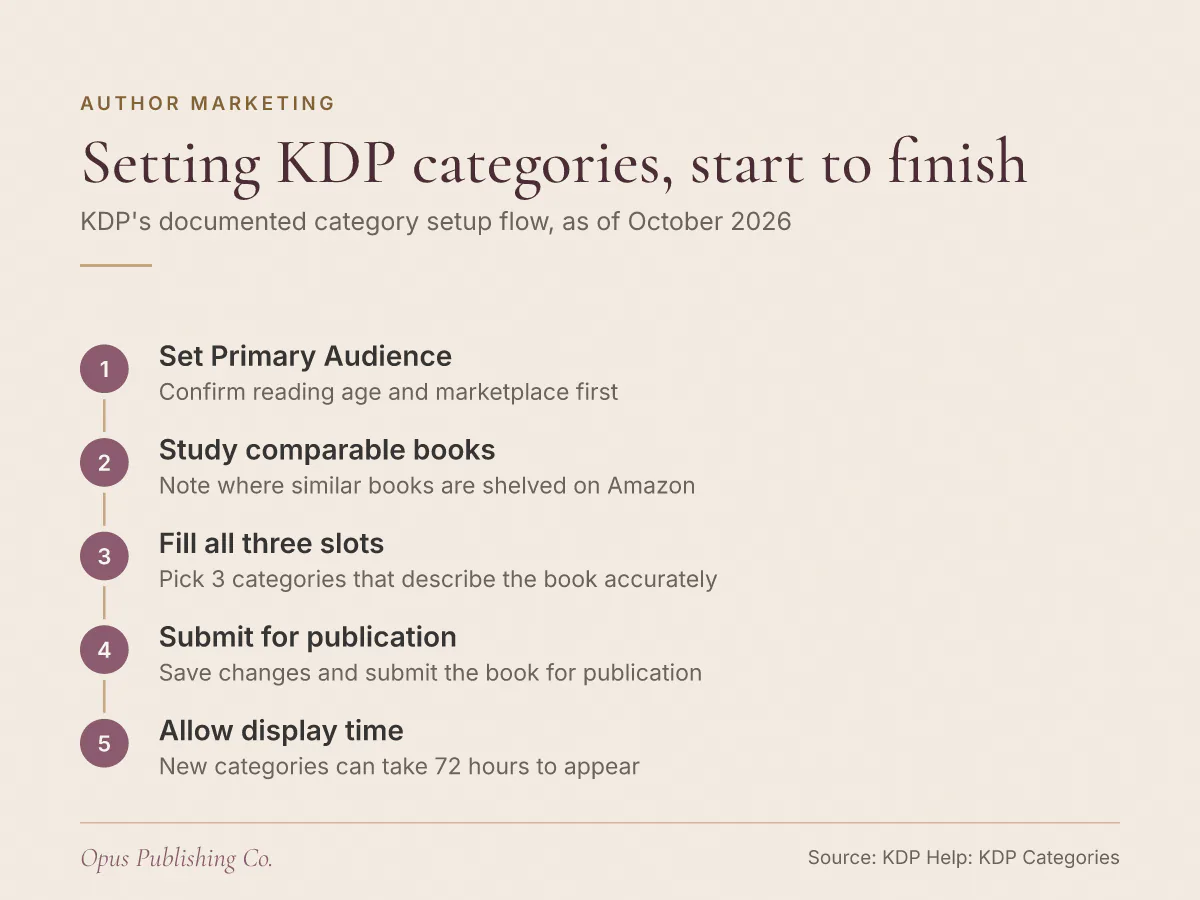
KDP gives you three categories when you create a book, and Amazon's guidance for filling them is specific: research where similar books sit, pick categories that genuinely describe your book, and balance popularity against relevance.
KDP treats categories as shelves. The KDP help page on categories describes them as digital shelves that organize books into genres and topics, serving the same purpose as the Science Fiction or Romance sections of a physical bookstore. As of October 2026, you can select 3 categories when creating a book in KDP, and those categories, together with the keywords you choose, tell Amazon where to shelve your book in a given store such as Amazon.com.
KDP's own three strategies are worth reading in the order it lists them:
- Research your genre. Look through Amazon and other bookstores to see where similar books are categorized, and decide whether your book fits there.
- Pick accurate categories. Choose a category that describes your book. Irrelevant categories create a poor shopping experience for readers.
- Balance popularity and relevance. Aim for categories popular enough to have reader interest, but not so broad or specific that your book gets lost.
If no category in KDP's category selection window fits, KDP's advice is to lean on keywords instead. Keywords are often more specific than categories, and they help readers find your book when they search for something unique.
One thing to settle before you start: nobody at Amazon will make this call for you. KDP states that its Support Team cannot give you specific recommendations or strategies for picking book categories.
Should You Pick Narrow or Broad Book Categories?
Narrow is not automatically better. KDP's stated rule is to aim for categories popular enough to have reader interest, but not so broad or specific that your book gets lost. Both failure modes are real, and the second one is the one authors walk into.
Most category advice points one direction: find the thinnest subcategory you can defend, rank in it, collect the badge. The logic is sound as far as it goes, because a thinly stocked shelf is easier to climb than a crowded one. The problem is what happens after you climb it. A rank on a shelf nobody browses produces a rank, and little else. Amazon book categories are not equally busy, and the only evidence available to you is what you can see in the store.
Three slots mean you are not forced to bet all of them on one level of specificity. KDP's example for a historical romance set in Victorian England shows the spread: Fiction > Historical Fiction, Fiction > Romance > Historical Fiction, and Fiction > Literary Fiction. Two of those are broad, one is three levels deep, and all three are honest descriptions of the same book.
Accuracy is not a soft preference here. KDP reviews category changes and says it does not tolerate categorization that misleads readers. If you select a category unrelated to your content, KDP may remove or change it. Its example is a book about Canadian National Parks placed in a Science Fiction category. Gaming a thin shelf you do not belong on is a selection Amazon can simply undo.
How Do You Research Where Comparable Books Sit?
Start from books, not from category lists. KDP recommends looking through Amazon and other bookstores to see where similar books are categorized, then deciding whether your book belongs there. The useful comparison is reader-level, not genre-level.
Work through it in this order:
- Build a list of books a reader would reasonably pick up instead of yours: same subgenre, same audience, similar length and price.
- Open each one's detail page on Amazon and note the categories it appears in.
- Open the full category list for your marketplace. KDP's categories help page links the browsable lists, separately for ebooks (the Kindle Store) and print books (the Books Store).
- Use the Categories link in the store's top menu to filter down into subgenres, and find the exact branch your comparable books sit in.
- Ask the honest question about each candidate: would a reader browsing this shelf be glad to find your book? If the answer is no, the category is wrong whatever its competition looks like.
Pay attention to how deep your comparable titles actually sit. If the books most like yours cluster three levels down, that branch is where readers of your kind of book are already shopping. If they spread across a broad category and a narrow one, copy the spread rather than picking a side.
Do KDP Categories Work the Same for Every Format and Marketplace?
No. Some categories are not available for every book format, such as ebook versus paperback versus comic, and categories differ in each marketplace. KDP's advice is to focus on your primary marketplace and pick the best-matching category between formats.
Primary Marketplace is the Amazon store you name as your book's main market, and KDP asks you to review it on the Details tab before you choose categories. It matters more than authors expect. There are thousands of book categories in each Amazon marketplace, and they change over time, so a category branch that exists on Amazon.com may not exist on Amazon.co.uk or Amazon.com.au. KDP's help page links separate category lists for twelve marketplaces: Amazon.com, Amazon.co.uk, Amazon.ca, Amazon.com.au, Amazon.de, Amazon.nl, Amazon.fr, Amazon.it, Amazon.es, Amazon.com.br, Amazon.in and Amazon.co.jp.
For an Australian or UK author, that means a US-focused category guide is giving you the wrong list. Open your own marketplace's list and research comparable books in your own store.
The format difference is easy to miss because the category lists are not identical across formats. If your paperback cannot use the exact category your ebook uses, pick the closest match for that format rather than leaving the slot weak. While you are in the format setup, two other decisions sit alongside categories: whether to use a free KDP ISBN or buy your own, and which trim size to format your paperback at.
Which Settings Control Children's and Teen Categories?
Primary Audience controls Children's and Teen categories. KDP asks you to review your Primary Audience and Primary Marketplace selections before choosing categories, because the reading age you set and your answer on sexually explicit content decide whether Children's and Teen categories are available to you at all.
Primary Audience is the section of your book's details where you declare who the book is for, including the reading age range. Here is what each setting does, as of October 2026:
| Primary Audience setting | Effect on your categories |
|---|---|
| Reading age 13 to 17 | Makes the book eligible for Teen & Young Adult categories |
| Reading age 12 to 15 | The equivalent Teen & Young Adult range on Amazon.de |
| Minimum reading age 12 plus a Juvenile category | May be categorized in Children's or Teen on Amazon.com and Amazon.co.uk, depending on other information about the book |
| Sexually explicit images or title set to Yes | Makes the book ineligible for Children's categories, and no reading age can be set |
| Maximum reading age 18+ | No longer available |
Two consequences follow if you write for children. First, KDP makes you answer the sexually explicit question Yes or No before you can proceed with title setup and select categories, and answering Yes makes the book ineligible for Children's categories. Second, if your picture book is not appearing on Children's shelves, check the reading age before you blame the category picker. Books with Juvenile categories and a minimum age of 12 may land in Children's or Teen on Amazon.com and Amazon.co.uk, and which one depends on other information about the book.
Why Is Your Book Not Showing in the Category You Picked?
Four causes cover most missing-category reports: fewer than 72 hours have passed, the category is no longer available on Amazon, your book is flagged for sexually explicit content, or KDP judged the category unrelated to your book.
Check them in that order:
- Timing. New category placements can take 72 hours to display. If you submitted yesterday, wait.
- Availability. Amazon updates its book categories from time to time, which can change the categories on your book. The category you picked may no longer exist.
- Content flags. Books flagged as containing sexually explicit images or titles are removed from categories such as Children's and Young Adult.
- Relevance. If a category is not related to your book's content, KDP may remove or change it to keep browsing useful for customers.
Most reports of a missing category come down to one of the first two, and both resolve themselves. The fourth is the one that needs a real fix: if KDP moved your book, the category was a stretch, and the answer is a more accurate pick rather than a resubmission of the same one.
What to Do This Week
Set your Primary Audience and Primary Marketplace before you open the category picker, then spend an hour in the store researching comparable books. The research is what makes the three picks easy.
- Confirm Primary Audience, including the reading age if your book is for children or teens, and answer the sexually explicit question.
- List eight to ten comparable books and record every category each one appears in.
- Choose three categories: at least one where your comparable books cluster deepest, and at least one broad enough to carry genuine browsing traffic.
- Submit, then check your book's detail page after 72 hours rather than the same afternoon.
- Write your keywords to cover the specific reader language that no category captures.
If you would rather hand over the metadata work, meaning the categories, keywords and book description that tell Amazon what your book is, Opus handles KDP setup, metadata and ISBN guidance as part of publishing and distribution. Either way, do the comparable-book research first. It is the input every other decision depends on.