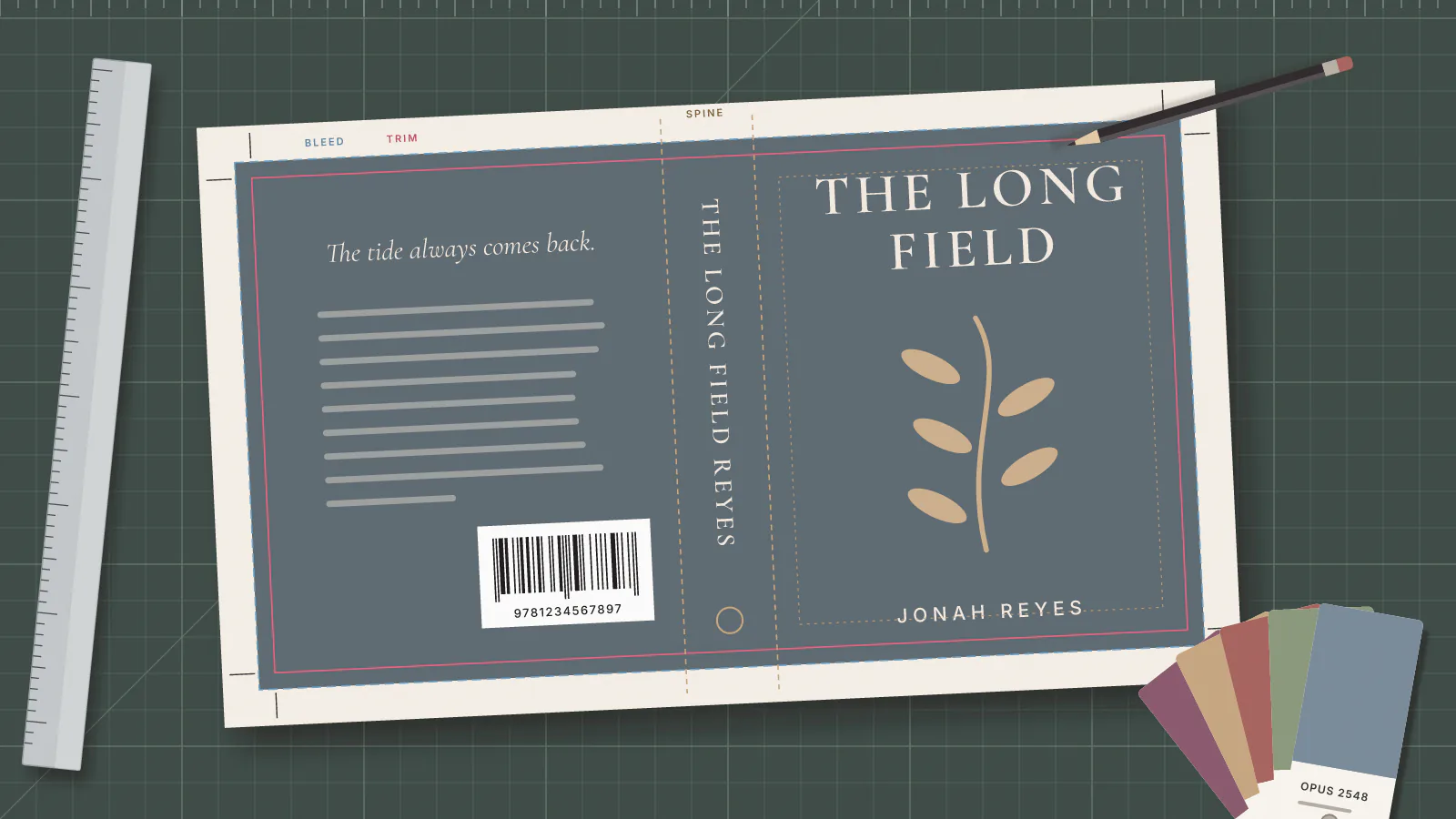
Your KDP paperback cover is one wide PDF, called a wrap, holding the back cover, the spine and the front cover as a single image. The spine is the only part you have to work out, and a KDP spine width calculator does one piece of arithmetic: page count multiplied by the thickness of one sheet of your chosen paper. Get that number wrong and every fold line in the file is wrong with it.
How Do You Calculate KDP Spine Width?
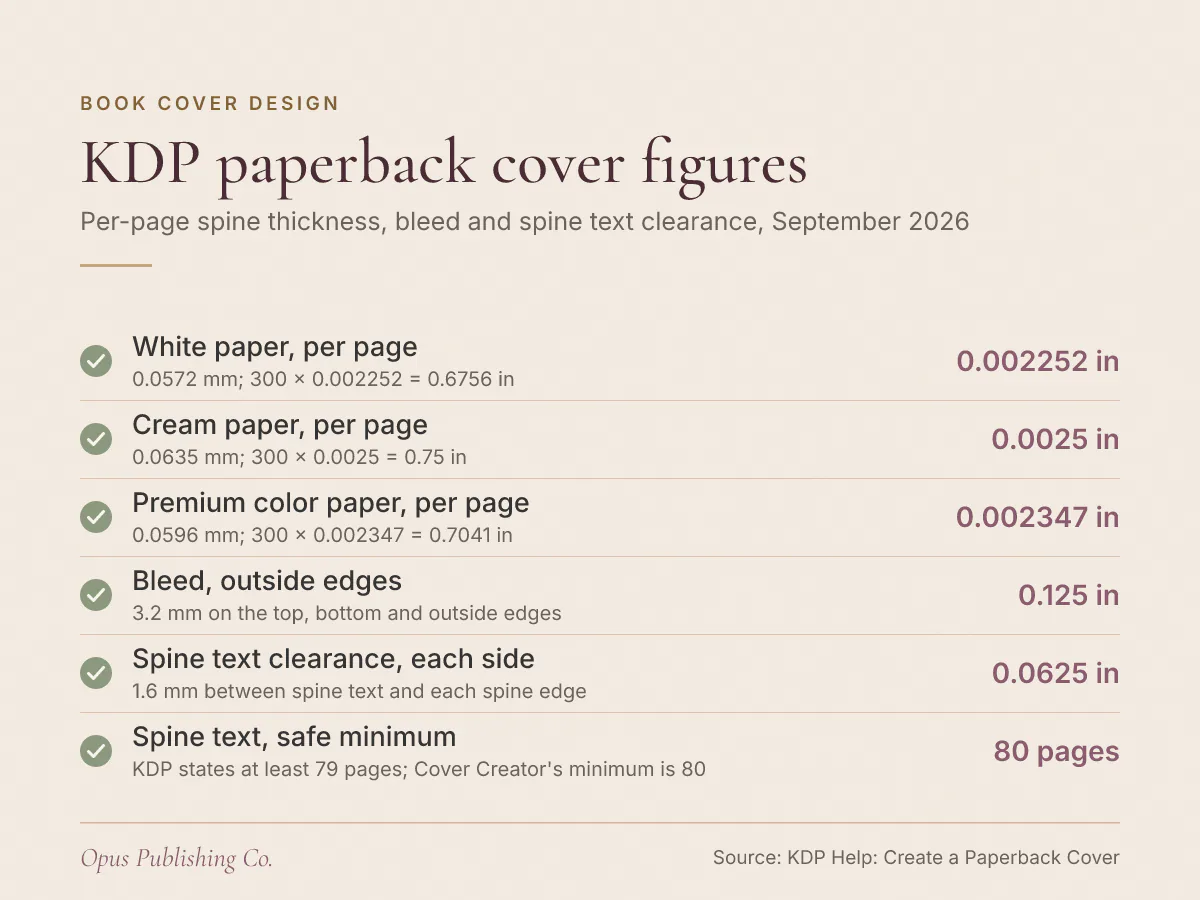
KDP spine width equals page count multiplied by a per-page paper thickness. As of September 2026, KDP's Create a Paperback Cover page lists 0.002252 inches per page for white paper and 0.0025 for cream. A 300-page paperback on white has a spine of 300 x 0.002252 = 0.6756 inches.
The spine is the outside edge of the book where the pages are gathered and bound. The book spine width formula KDP publishes on its Create a Paperback Cover help page has two terms and nothing else: your page count, and the per-page figure for the paper you picked. Four figures cover the choices, with KDP's millimeter equivalents in brackets:
- White paper, black ink: 0.002252 inches (0.0572 mm) per page
- Cream paper, black ink: 0.0025 inches (0.0635 mm) per page
- Premium color paper: 0.002347 inches (0.0596 mm) per page
- Standard color paper: 0.002252 inches (0.0572 mm) per page
Use the page count of the PDF you actually upload, not the page count of your Word file. Those two numbers separate the moment anyone changes a font size, a chapter break or the front matter (the title and copyright pages that run before chapter one). The spine is therefore the last thing to settle in print book formatting, not the first. KDP also rejects manuscripts with missing pages or excessive blank pages, so padding the count to reach a rounder spine is not an option.
Which Paper Type Changes Your Spine Width the Most?
Cream paper gives the widest spine of the paper types KDP publishes a figure for, at 0.0025 inches per page, ahead of white paper's 0.002252 inches. On a 300-page book that difference is 0.75 minus 0.6756, or 0.0744 inches of extra spine.
Here is the same 300-page, 6" x 9" paperback measured across KDP's paper options, with the full cover width each one produces once bleed (artwork that runs past the trim line) is added.
| Paper and ink | Per page | Spine at 300 pages | Full cover width |
|---|---|---|---|
| Black ink, white paper | 0.002252 in (0.0572 mm) | 300 x 0.002252 = 0.6756 in | 0.125 + 6 + 0.6756 + 6 + 0.125 = 12.9256 in |
| Black ink, cream paper | 0.0025 in (0.0635 mm) | 300 x 0.0025 = 0.75 in | 0.125 + 6 + 0.75 + 6 + 0.125 = 13 in |
| Premium color, white paper | 0.002347 in (0.0596 mm) | 300 x 0.002347 = 0.7041 in | 0.125 + 6 + 0.7041 + 6 + 0.125 = 12.9541 in |
| Standard color, white paper | 0.002252 in (0.0572 mm) | Not offered at 6" x 9" | Not offered at 6" x 9" |
| Black ink, groundwood paper | No figure published | Use KDP's cover calculator | Use KDP's cover calculator |
Two rows in that table trip authors up. Standard color is not a choice at the four most common US trim sizes above 5" x 8". KDP's Print Options page shows it as not available at 5.5" x 8.5", 6" x 9", 7" x 10" and 8.25" x 11". Groundwood is the 45 pound (60 GSM, grams per square meter) paper KDP added for black and white paperback interiors. Groundwood appears in KDP's print options but carries no per-page spine figure on the cover help page, so take its spine from KDP's own calculator.
Choose the paper before the designer opens a file. KDP's Print Options page says ink and paper type lock after publication because of ISBN requirements, and the ISBN is the International Standard Book Number that identifies your edition. You cannot move a published paperback between standard color, premium color and black and white. The same page count and paper decisions also set your printing cost. KDP notes that color printing costs more, and that groundwood printing costs run approximately 5% lower per page than cream and white paper, which feeds straight into what you earn per paperback copy.
What Is the Full Cover Size for a KDP Paperback?
Full cover width is bleed plus back cover width plus spine width plus front cover width plus bleed. Full cover height is bleed plus trim height plus bleed. KDP's bleed allowance is 0.125 inches (3.2 mm) on the top, bottom and outside edges.
Bleed is printing shorthand for artwork that runs past the trim line so no white sliver appears after the book is cut. Trim size is the finished page size, so the trim height of a 6 by 9 inch paperback is the 9. KDP's cover calculator labels the zones you need to respect inside those dimensions:
- Full cover: the total width and height of the file, front, back, spine and wrap together
- Front cover: the visible area after printing, the same size as the back cover
- Safe area: where all text and images belong, so nothing shifts between panels during printing
- Margin: keep text and images out, unless they are meant to wrap to the inside cover
- Spine safe area and spine margin: the same idea applied to the spine
- Barcode margin: clearance that keeps the barcode from shifting and lets it scan
Say your 6" x 9" novel comes back from formatting at 300 pages on cream paper. As an example, spine width = 300 x 0.0025 = 0.75 inches. Cover width = 0.125 + 6 + 0.75 + 6 + 0.125 = 13 inches. Cover height = 0.125 + 9 + 0.125 = 9.25 inches. Build the paperback cover document at those dimensions, at 300 DPI (dots per inch) or better, and place the fold lines 0.125 + 6 = 6.125 inches in from each outside edge.
When Can You Put Text on the Spine?
Spine text is allowed once your book reaches at least 79 pages, according to KDP's Create a Paperback Cover page. A cover carrying spine text on a shorter book will be rejected and need adjustment before the book goes live.
That threshold is stated three different ways on one KDP page. The note near the top says at least 79 pages. The spine measurement section says KDP only prints spine text on books with more than 79 pages. The same page then says the minimum page count for spine text in Cover Creator, KDP's browser-based cover tool, is 80 pages. Set your floor at 80 pages and all three versions agree.
Will Spine Text Be Legible at 80 Pages?
Spine text at 80 pages clears KDP's page-count rule, but the strip is barely taller than the smallest font KDP allows. KDP requires at least 0.0625 inches (1.6 mm) between spine text and each edge of the spine, and asks for a minimum 7-point font on the cover. A 7-point character is 7 divided by 72 of an inch, about 0.0972 inches tall.
Work it through on white paper, as an example. A 79-page spine measures 79 x 0.002252, or about 0.1779 inches. Take off the clearance on both sides and 0.1779 minus 0.125 leaves about 0.0529 inches of usable height, roughly half what a 7-point character needs. The spine first clears 0.0972 inches at 99 pages, where 99 x 0.002252 = 0.2229 inches and 0.2229 minus 0.125 leaves 0.0979 inches. On cream paper the same threshold arrives at 89 pages, because 89 x 0.0025 = 0.2225 inches and 0.2225 minus 0.125 leaves 0.0975 inches.
That is arithmetic from KDP's published figures, not a KDP rule. Read it as the line where spine text stops being a compliance question and becomes a design one. Under roughly 100 pages on white paper, put the title on the front and back, run the background color across the spine and leave the lettering off.
Should You Use KDP's Cover Calculator or Do the Math?
Use KDP's cover calculator and template generator for the file you upload, and do the arithmetic yourself as a cross-check. KDP's calculator takes your ink and paper choice, trim size and page count, then draws a layout with the full cover, safe area, bleed, margin and spine marked.
Third-party spine calculators are only as current as the day somebody built them, and two failure modes turn up repeatedly. The first adds a fixed allowance for the thickness of the cover stock on top of the page-count arithmetic. KDP's cover page gives no such allowance. The second uses a per-page figure for standard color that does not match the 0.002252 inches KDP publishes. Either error moves your fold lines, and the spine is the least forgiving strip in the file.
Run your own number, generate KDP's template, and compare the two spine widths before any artwork gets drawn. If they disagree, trust KDP's template and find out why your inputs differ. While the file is open, check it against KDP's upload requirements:
- One PDF containing back cover, spine and front cover as a single image
- 300 DPI minimum, with images in CMYK (the four-ink mode used for full-color printing), sized at 100% and flattened to one layer
- Files over 650MB will not convert, and KDP recommends 40MB or less
- Fonts embedded, transparencies flattened, crop marks and template text removed, no file security
- Cover text at least 7-point and at least 0.125 inches (3.2 mm) inside the trim lines, with no front or back cover text running into the spine area
Anyone doing book cover design for print works from the template outward for exactly this reason: the geometry is fixed before the first shape goes on the canvas.
What Goes Wrong When the Spine Width Is Off?
Spine artwork lands in the wrong place. KDP asks you to allow 0.0625 inches (1.6 mm) of variance on either side of the fold lines, because every book varies slightly when bound. A spine built to the wrong width pushes title text or a color block onto the front cover.
The four causes worth guarding against:
- The page count moved after the cover was built. Recalculate the spine and rebuild the wrap from a fresh template whenever the interior changes, even by two pages.
- Hard edges at the folds. KDP does not recommend hard edges on the spine, because the known shift variance makes a crisp color break more obvious.
- Borders. KDP does not recommend them either. If you use one, it should cover at least 0.25 inches (6.4 mm) inside the trim line, and a white border has to meet KDP's minimum border width or the file may be rejected.
- Text that cannot be read. KDP flags covers where text blends into the background, so check contrast on the spine specifically, where the strip is narrow and the fold catches shadow.
Two details on the back cover round this out. Cover text on your file has to match the book details you entered at title setup, including title, author name, edition and ISBN. KDP exempts low-content books published with the Publish without an ISBN option from putting ISBN information on the cover. You can also upload a cover with or without a barcode: leave it out and KDP places one on the back cover for you.
How to Get Your Cover Files Ready This Week
Order the work so the spine number is calculated once and never guessed. Settle the interior, choose the paper, then build the cover to the page count you actually have.
- Export the final interior PDF and write down its page count.
- Choose ink and paper in the Print Options section of your KDP Bookshelf, under Edit paperback content.
- Calculate the spine by hand: page count multiplied by the per-page figure for that paper.
- Generate KDP's template for your trim size, page count and paper, and check its spine against your number.
- Build the wrap at the full cover dimensions, keeping all text inside the safe area and spine text 0.0625 inches clear of each fold.
- Decide on spine text using page count and legibility, not page count alone.
- Order a proof, a single printed copy for checking, before you publish. KDP recommends a proof so you can confirm the ink and paper type suits the book.
If the page count moves after step 4, repeat steps 3 to 5. Recalculating costs you a few minutes of arithmetic; a rejected cover costs you an upload cycle.