The KDP paperback royalty calculation is simple on paper: your list price times your royalty rate, minus the cost of printing the copy. The catch is that the rate, the printing cost and the lowest price KDP accepts all shift with your list price, page count and trim size. For example, a 300-page black ink paperback listed at 14.99 USD on Amazon.com earns about 4.39 USD per copy.
How does KDP calculate paperback royalties?
KDP multiplies your list price by your royalty rate, then subtracts the printing cost of that copy. On Amazon marketplaces the rate is 50% or 60% depending on your list price and marketplace. Through Expanded Distribution it is 40%.
That is the whole formula on KDP's paperback royalty help page: (royalty rate x list price) minus printing costs = royalty. The page's own example, as of September 2026, is a 333-page black ink paperback in a regular trim size listed at $15 on Amazon.com. It works out to (0.60 x $15) - $5.00 = $4.00 per copy.
Get the order right. The rate applies to the full list price first, and the printing cost comes off afterward. Taking 60% of the price after printing would give 0.60 x (15 - 5.00) = 6.00 USD for the same book, which overstates the royalty by 2.00 USD.
Two details matter more than the formula itself. The printing cost isn't a flat fee you look up once: it's built from your page count, ink, paper, trim size and the marketplace where the reader ordered. And the royalty rate depends on the list price you choose, with a cutoff at 9.99 USD on Amazon.com, so a price just below it quietly drops you to the lower rate.
KDP prints each copy on demand and takes the printing cost out of your royalty, so you never pay for inventory upfront. The trade-off is that every sale carries the full printing cost, which is why interior decisions show up directly in your earnings.
When does KDP pay a 60% royalty instead of 50%?
KDP pays 60% when your list price is at or above the threshold for that marketplace, which is 9.99 USD on Amazon.com, and 50% below it. Each store and currency has its own threshold, so check every marketplace where you set a price.
These are the cutoffs from KDP's royalty page as of September 2026:
| Marketplace | 50% royalty at or below | 60% royalty at or above |
|---|---|---|
| Amazon.com | 9.98 USD | 9.99 USD |
| Amazon.co.uk | 7.98 GBP | 7.99 GBP |
| Amazon.de, .fr, .it, .es, .nl, .ie and .com.be | 9.98 EUR | 9.99 EUR |
| Amazon.ca | 13.98 CAD | 13.99 CAD |
| Amazon.com.au | 13.98 AUD | 13.99 AUD |
| Amazon.co.jp | 999 JPY | 1,000 JPY |
| Amazon.pl | 39 PLN | 40 PLN |
| Amazon.se | 109 SEK | 110 SEK |
The higher rate applies to the whole list price, not just the part above the line. That makes a price one step under a threshold the worst place to sit: you give up a tenth of the price in royalty to save your reader a single cent or unit of currency.
For example, a 300-page black ink paperback in a regular trim size costs 0.85 GBP + (300 x 0.010 GBP) = 3.85 GBP to print on Amazon.co.uk. At 7.98 GBP the royalty is (0.50 x 7.98) - 3.85 = about 0.14 GBP. At 7.99 GBP it becomes (0.60 x 7.99) - 3.85 = about 0.94 GBP.
How much does KDP charge to print a paperback?
KDP's printing cost is a fixed cost per book plus a per-page cost multiplied by your page count. Black ink paperbacks of 24 to 110 pages pay only the fixed cost. Ink, paper, trim size and the ordering marketplace all change the rates.
The formula on KDP's printing cost page is fixed cost + (page count x per-page cost) = printing cost. These are the Amazon.com rates as of September 2026:
| Paperback on Amazon.com | Regular trim | Large trim |
|---|---|---|
| Black ink, 24 to 110 pages | 2.30 USD per book | 2.84 USD per book |
| Black ink, 110 to 828 pages | 1.00 USD + 0.012 USD per page | 1.00 USD + 0.017 USD per page |
| Standard color, 72 to 600 pages | 1.00 USD + 0.0255 USD per page | 1.00 USD + 0.0402 USD per page |
| Premium color, 42 to 828 pages | 1.00 USD + 0.065 USD per page | 1.00 USD + 0.08 USD per page |
Groundwood paper runs about 5% cheaper per page than cream or white paper with black ink. Bleed settings and cover finish don't change the printing cost, so you can decide those on design grounds alone.
Online calculators don't always use KDP's current rates. Before you rely on any figure, including the ones here, check it against KDP's own Printing Cost & Royalty Calculator.
Does trim size change the printing cost?
Yes. Large trim sizes, meaning more than 6.12 inches wide or more than 9 inches tall, cost more to print at every page count. On Amazon.com a short black ink book pays 2.84 USD instead of 2.30 USD, and longer books pay 0.017 USD per page instead of 0.012 USD. At 300 pages, that adds 300 x 0.005 USD = 1.50 USD to the cost of every copy.
One trap to know about: KDP's royalty page says trim size doesn't affect printing cost, but the printing cost page lists separate, higher rates for large trim sizes. Go by the rate tables and the calculator, not the summary sentence.
How much does a KDP paperback earn per copy?
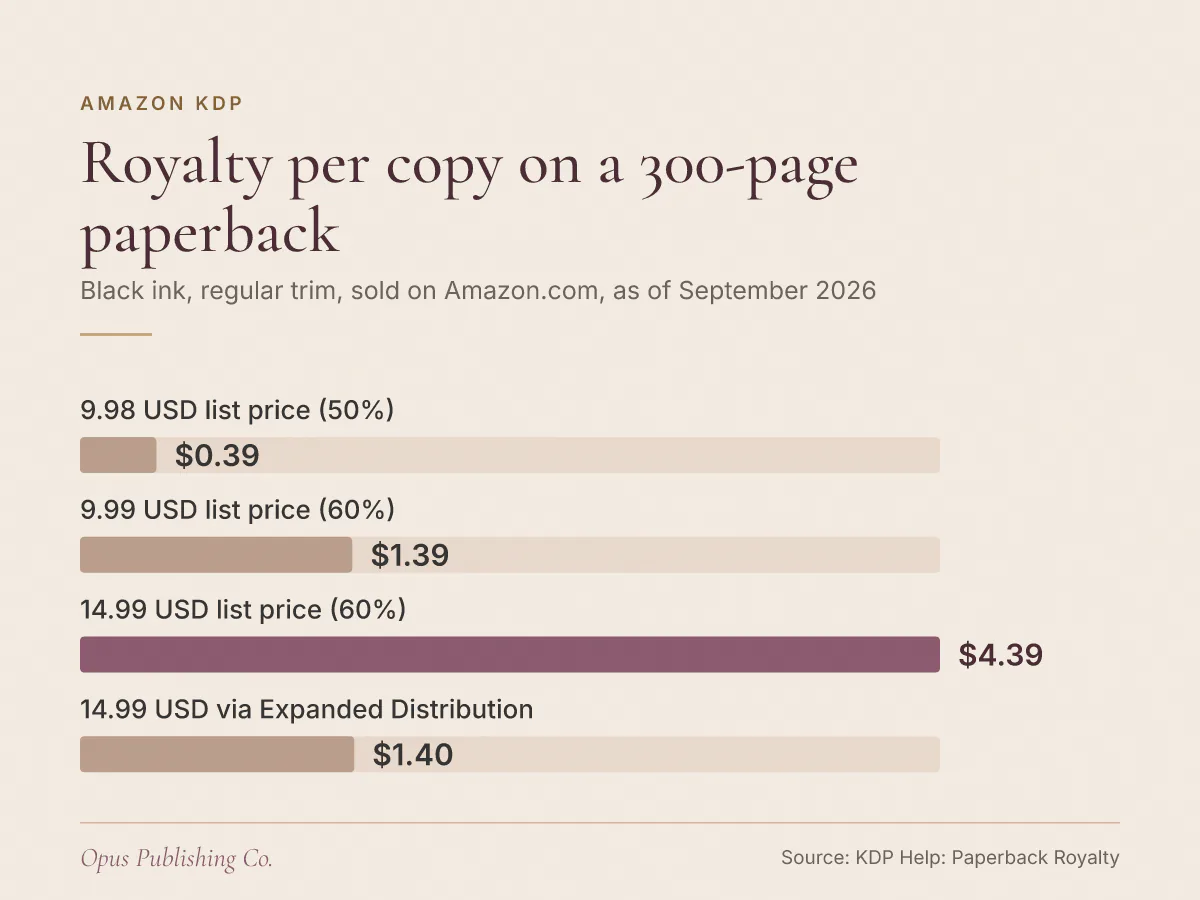
For example, a 300-page black ink paperback in a regular trim size earns about 0.39 USD per Amazon.com sale at 9.98 USD, 1.39 USD at 9.99 USD and 4.39 USD at 14.99 USD. A large trim size or an Expanded Distribution sale cuts that last figure sharply.
These are worked examples using the Amazon.com rates above. The printing cost for this book is 1.00 USD + (300 x 0.012 USD) = 4.60 USD, which matches KDP's own example for a 300-page book.
| Example on Amazon.com | Rate | Math | Royalty per copy |
|---|---|---|---|
| Lowest allowed price, 9.20 USD | 50% | (0.50 x 9.20) - 4.60 | 0.00 USD |
| 9.98 USD | 50% | (0.50 x 9.98) - 4.60 | 0.39 USD |
| 9.99 USD | 60% | (0.60 x 9.99) - 4.60 | 1.39 USD |
| 14.99 USD | 60% | (0.60 x 14.99) - 4.60 | 4.39 USD |
| 14.99 USD, large trim | 60% | (0.60 x 14.99) - 6.10 | 2.89 USD |
| 14.99 USD, Expanded Distribution | 40% | (0.40 x 14.99) - 4.60 | 1.40 USD |
Three things stand out:
- Moving from 9.98 USD to 9.99 USD adds about a dollar per copy for one cent.
- The large trim version earns 4.39 USD - 2.89 USD = 1.50 USD less on every sale at the same price.
- The Expanded Distribution sale pays less than a third of the Amazon.com royalty.
Page count changes the picture just as much. For example, a 100-page black ink paperback pays only the 2.30 USD fixed cost. At 9.99 USD it earns (0.60 x 9.99) - 2.30 = about 3.69 USD per copy, more than twice what the 300-page book earns at that price.
The royalties above are rounded to the nearest cent. Use KDP's Printing Cost & Royalty Calculator to confirm the exact figures for your own book before you publish.
What is the minimum list price for a KDP paperback?
KDP's minimum list price is your printing cost divided by your royalty rate, so the royalty always covers printing. Because the rate itself depends on price, the real floor can land on the 60% threshold rather than on the formula's result.
KDP describes two scenarios. In the 60% range the minimum is printing cost / 0.60, and in the 50% range it is printing cost / 0.50. KDP won't let you enter anything lower.
Follow that through for the 300-page book. Its 50% minimum is 4.60 / 0.50 = 9.20 USD, which sits inside the 50% band on Amazon.com, so 9.20 USD is the floor. The 60% formula gives 4.60 / 0.60 = about 7.67 USD, but no price that low qualifies for 60%, so that number never applies. If a calculator shows the 60% result as your minimum, it has skipped that step.
Now take KDP's 333-page example with its 5.00 USD printing cost. Its 50% minimum would be 5.00 / 0.50 = 10.00 USD, which is above the top of the 50% band, so no price in that band clears it. Its 60% minimum is 5.00 / 0.60 = about 8.33 USD, which any price of 9.99 USD or more clears.
Following those rules, the lowest price you could set for that book is 9.99 USD, earning (0.60 x 9.99) - 5.00 = about 0.99 USD. The calculator shows the exact minimum for your file, so confirm it there.
How does Expanded Distribution change your KDP royalty?
Expanded Distribution sales pay 40% of the list price in that channel, minus printing costs. That leaves a much smaller royalty than an Amazon sale, and these units show up in your reports about 30 days after the end of the month they sold.
Expanded Distribution is the KDP option that sells your paperback through distribution channels beyond Amazon's own marketplaces. KDP's own example shows the gap: the 333-page book at a 15 USD list price earns (0.40 x 15) - 5.00 = 1.00 USD through Expanded Distribution, against 4.00 USD on Amazon.com.
Work out the break-even point before you switch it on. At 40%, an Expanded Distribution sale earns nothing until the list price reaches printing cost / 0.40. For the 300-page example, that means 4.60 / 0.40 = 11.50 USD. Below that price, the 40% royalty wouldn't even cover the printing cost.
What should you do before you set your paperback price?
Lock your final page count and trim size first, then price each marketplace against its royalty threshold and printing cost. An hour with KDP's calculator this week can be worth a dollar or more on every copy you sell.
- Finalize the interior. Your page count sets the printing cost, so price only after formatting is done. If your layout isn't settled yet, print book formatting can lock in the page count before you commit to a price.
- Choose the trim size with cost in mind. Check whether your preferred size counts as large trim and compare both rates at your page count.
- Clear the 60% threshold in every marketplace you price by hand. Aim for at least 9.99 USD, 7.99 GBP, 9.99 EUR, 13.99 CAD, 13.99 AUD, 1,000 JPY, 40 PLN and 110 SEK where those prices suit your genre.
- Run the calculator for each store. Confirm the printing cost, minimum list price and royalty in every currency.
- Decide on Expanded Distribution with the math in front of you. Compare its 40% royalty with your Amazon royalty at the price you chose.
- Recheck after any interior change. More pages, color ink or a move to a large trim size all raise the printing cost, and with it your minimum price.
If you would rather hand off the setup, our publishing service covers the KDP setup, metadata and upload.