You priced your ebook on Amazon's Kindle Direct Publishing (KDP), chose the 70% option, and your reports still show 35% on some sales. The KDP 70 percent royalty requirements are not just a price band: the rate is settled sale by sale, after VAT and delivery costs, by where your buyer lives. Here is what KDP's own royalty page says, and which numbers it leaves to other pages.
What Are KDP's 70 Percent Royalty Requirements?
KDP offers two royalty options for every Kindle eBook: 35% and 70%. The 70% option pays 70% of your list price without VAT, less delivery costs, but only on eligible books sold to customers in the 70% territories. Outside those territories, the same book earns 35%.
The rates and conditions here come from KDP's eBook royalty page as of October 2026. Your list price is the price you set for the book in KDP. Delivery costs are what KDP charges to send your Kindle file to a buyer. Two further conditions catch authors out. KDP states that the 70% royalty option is for in-copyright works only, and that it applies only to books sold to customers in the countries listed on its Pricing Page. You do not need to live in one of the 70% territories yourself.
VAT, or value added tax, is a consumption tax added to the retail price in many countries. KDP subtracts the applicable VAT from your list price before it applies either royalty rate, so your royalty is calculated on the price without tax rather than the price your reader pays at checkout.
One figure is deliberately missing from this article. KDP's eBook royalty page does not print the list price range that makes a book eligible for the 70% option. That lives on KDP's Digital Book Pricing Page and its eBook List Price Requirements page, both linked from the help page inside your KDP account. The price range is the part of this rule Amazon changes. The guides currently ranking for it disagree with each other about the ceiling, so read Amazon's page for the range in force today rather than any blog post, including this one.
Why Does Your Book Show Both 70% and 35% Royalty Rates?
Seeing both 70% and 35% royalty rates for one book on your KDP Bookshelf is expected behavior, not a pricing error. KDP applies the rate sale by sale, based on the location of the customer who buys the book, and Amazon.com serves customers worldwide.
The Bookshelf is the title list in your KDP account, and your actual royalty per sale is determined at the time of purchase. A reader in one of the 70% territories triggers the 70% calculation. A reader outside them earns you 35% of list price without VAT, on the same book, at the same price, in the same marketplace.
That is why a month's report can show a blended rate you never selected. If a meaningful share of your readers sit outside the 70% territories, your average per-sale royalty lands below 70% however carefully you priced the book. Nothing in your pricing section needs changing, and switching to the 35% option would not improve those sales either.
How Does KDP Calculate the 70% Royalty on an eBook?
KDP calculates the 70% royalty as Royalty Rate x (List Price - applicable VAT - Delivery Costs). The 35% option uses Royalty Rate x (List Price - applicable VAT), with no delivery deduction. Both rates therefore apply to the price without tax.
KDP's own worked example on its royalty page uses a Spanish sale. Take a €1.99 VAT-inclusive list price on Amazon.es, Spanish VAT of 4%, delivery costs of €0.10 per MB (megabyte) and a file size of 1 MB. The royalty is 0.70 x (€1.99 - €0.08 - €0.10) = €1.27. The VAT figure comes from 4% x €1.91 = €0.08, because €1.91 + €0.08 = €1.99.
The 35% option does not escape the VAT deduction. KDP's example for that option starts from a $0.99 VAT-inclusive list price. A customer whose applicable VAT rate is 0% returns 0.35 x ($0.99 - $0.00) = $0.35. A customer whose applicable VAT rate is 20% returns 0.35 x ($0.99 - $0.165) = $0.29. Same book, same list price, different net, because the tax came out first.
| What KDP checks | 35% royalty option | 70% royalty option |
|---|---|---|
| Rate applied to list price without VAT | 35% on every sale | 70% in the 70% territories, 35% outside them |
| Delivery costs deducted | No | Yes, averaging $0.06 per unit sold and varying by file size |
| Buyer's location changes the rate | No | Yes, settled at the time of purchase |
| Public domain content eligible | Yes | No, in-copyright works only |
| If Amazon sells below your list price to match a third party | Not stated on KDP's eBook royalty page | 70% of Amazon's sale price, less delivery costs and VAT |
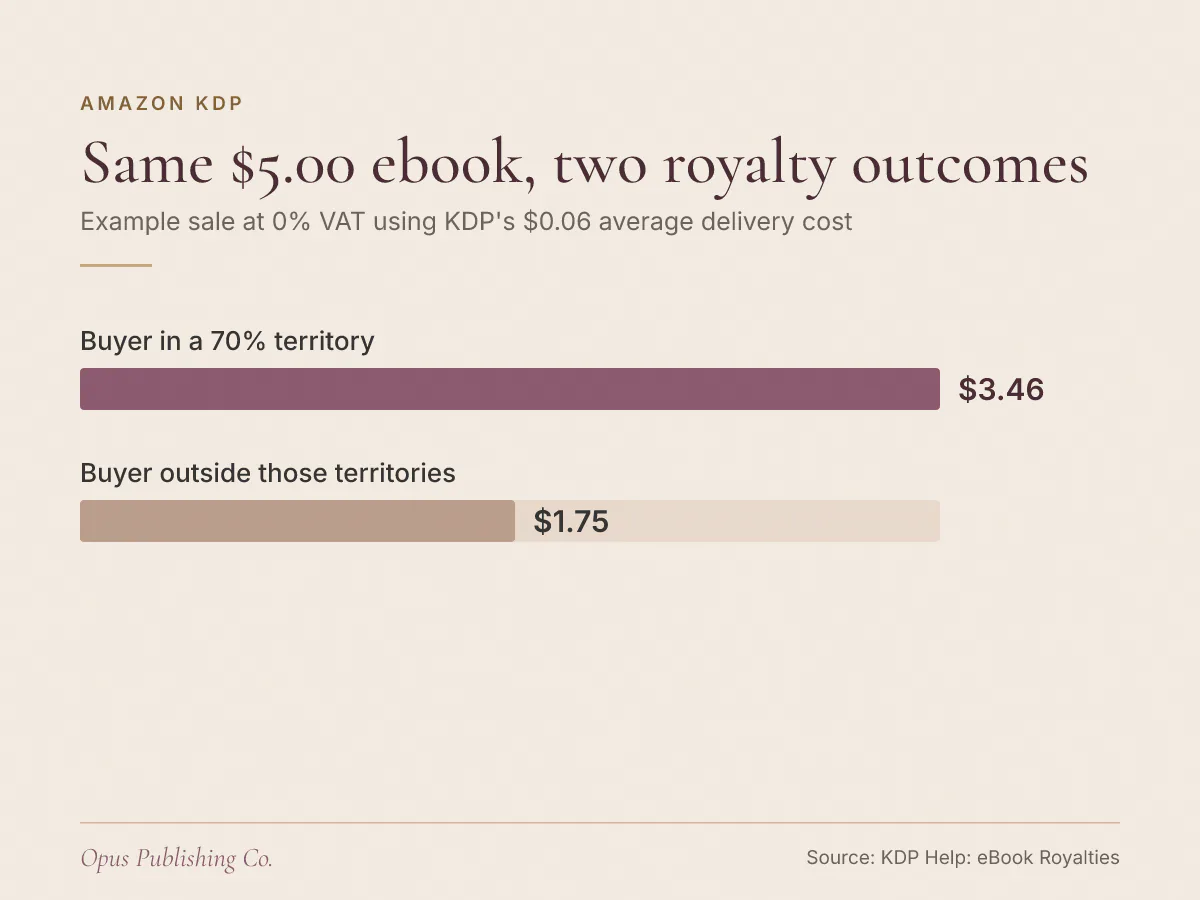
A US example makes the swing concrete. For example, take a buyer whose applicable VAT rate is 0%, a list price of $5.00 and KDP's stated average delivery cost of $0.06 per unit: 0.70 x ($5.00 - $0.00 - $0.06) = $3.46. The same sale to a customer outside the 70% territories pays 0.35 x ($5.00 - $0.00) = $1.75, roughly half as much. The price did not change. The buyer did.
How Much Do Delivery Costs Cut Your Kindle eBook Royalty?
Delivery costs are what KDP charges to deliver your Kindle file to a buyer, and they are deducted only under the 70% option. KDP's eBook royalty page puts average delivery costs at $0.06 per unit sold as of October 2026, and says they vary by file size.
The word doing the work there is "average". KDP's page does not publish a flat per-book delivery charge, because the deduction moves with file size. Its Spanish example shows the shape of the charge: €0.10 per MB against a 1 MB file.
Illustrated books are where this bites hardest. A children's picture book, a cookbook or a photography title converts to a far larger Kindle file than a text-only novel, so the deduction scales with it while the list price usually does not. Three things are inside your control:
- Image resolution and compression, which is the single largest driver of converted file size in an illustrated book.
- How many full-page images the design genuinely needs, as against decorative ones.
- Embedded fonts and unnecessary assets left in the file by the conversion tool.
Careful ebook formatting is the lever here, and the number that matters is the size of the finished Kindle file rather than the length of the manuscript.
Can Amazon's Price Matching Lower Your eBook Royalty?
Amazon can sell your ebook below your list price to match a third party, and KDP then pays 70% of its own sale price rather than your list price. KDP's royalty page states this for eligible books sold in the 70% territories, less delivery costs and less any applicable VAT.
The trigger is wider than most authors expect. KDP's page names two cases: Amazon matching a third party selling any digital or physical edition of the book, and Amazon matching its own price for a physical edition of the book. A discounted paperback of the same title therefore sits in the same rule as a rival ebook retailer's sale price.
Two practical consequences follow. First, if you discount the same ebook elsewhere, you can pull down the base Amazon calculates your Kindle royalty from. Second, a print price promotion is not isolated from the ebook. KDP points to its Pricing Page and the KDP Terms and Conditions for the remaining detail, and its eBook royalty page does not state an equivalent adjustment for the 35% option.
Which eBooks Only Qualify for the 35% Royalty Option?
Public domain works, and works consisting primarily of public domain content, are only eligible for the 35% royalty option. KDP reserves the 70% royalty option for in-copyright works. Separately, sales to customers outside the 70% territories pay 35% whichever option you selected.
Public domain means copyright protection has expired or never applied, so anyone may publish the work. A plain reprint of an out-of-copyright novel is the classic case: the text is free to use, and the 70% option is closed to it.
KDP states the repair plainly. If you add substantial original content, or publish an original translation, so that your book is no longer primarily public domain, it becomes eligible for the 70% royalty option. An original translation is the route KDP names outright. Substantial original content is the broader one, and KDP does not publish a threshold for how much of it counts, so read its publishing public domain content page before you commit to an edition built on an old text.
Does KDP Select Change Your eBook Royalty Rate?
KDP's eBook royalty page does not tie the 35% or 70% choice to KDP Select. KDP Select is a free 90-day program for Kindle eBooks that adds Kindle Unlimited, Free Book Promotions and Kindle Countdown Deals, and all authors are eligible regardless of where they live.
Enrolling a Kindle eBook in KDP Select includes it in Kindle Unlimited automatically. Kindle Unlimited is Amazon's subscription service, and a Kindle Unlimited read is a separate calculation from the per-copy rate this article covers. How it earns is covered on KDP's Royalties in Kindle Unlimited page, not on the eBook royalty page.
Kindle Countdown Deals, KDP's limited-time discount promotion, run only on the Amazon.com and Amazon.co.uk marketplaces and are not available on Amazon.co.jp. Some third-party guides tie KDP Select enrollment to 70% eligibility in particular countries. Neither KDP's eBook royalty page nor its KDP Select page says that, so treat it as unverified and check the Pricing Page and the KDP Terms and Conditions before you plan around it.
What to Check in Your KDP Account This Week
Five checks will tell you whether your royalty rate is set wrongly or simply misread. Work through them before you change a price, because a price change resets nothing if the cause is your readers' location.
- Open the pricing section of each title and confirm which royalty option is selected, then read KDP's eBook List Price Requirements page for the list price range in force today.
- Open your Month-to-Date report and check where your sales are coming from. Sales to customers outside the 70% territories explain a blended rate faster than any pricing experiment will.
- Check the file size of the finished Kindle file for the title. A large file raises the delivery deduction on every 70% sale.
- If the book draws on out-of-copyright material, read KDP's publishing public domain content page before planning a revised edition.
- Compare the ebook's price against your print edition's current price, since a discounted paperback sits inside the same price matching rule.
If the numbers still refuse to line up, the Opus publishing and distribution page covers how KDP pricing and metadata setup works, and our breakdown of KDP paperback royalty calculation answers the same question for print.