You can narrate your own audiobook at home and pass ACX's technical screening, and the deciding factor is your room, not your microphone. ACX measures the average level, the peak level and the noise floor of every file you upload, and background noise is the one number that editing cannot fix cleanly. Treat the space first, then set the gain.
Can You Narrate Your Own Audiobook and Pass ACX?
Yes. ACX accepts author-narrated audiobooks, and as of November 2026 its submission requirements insist the narration be performed by a human rather than generated by unauthorized AI or text-to-speech. What gets rejected is a file whose levels or background noise sit outside the measured ranges.
ACX is the Audiobook Creation Exchange, Amazon's marketplace for producing and distributing audiobooks to Audible and Amazon. Every file you submit goes through a technical screening before a human ever listens to your performance. The screening does not care that you wrote the book.
That screening is also the whole reason authors who record audiobooks at home get stuck. Reading well is the part you already know how to do. The part that fails is physics: an untreated spare room adds reflections and a constant hum that your ears filter out and a meter does not.
So the honest answer is yes, with one condition. A plain microphone in a treated corner passes; an expensive microphone in an untreated room does not. Spend your first effort on the space.
What Does ACX Measure in Every File You Upload?
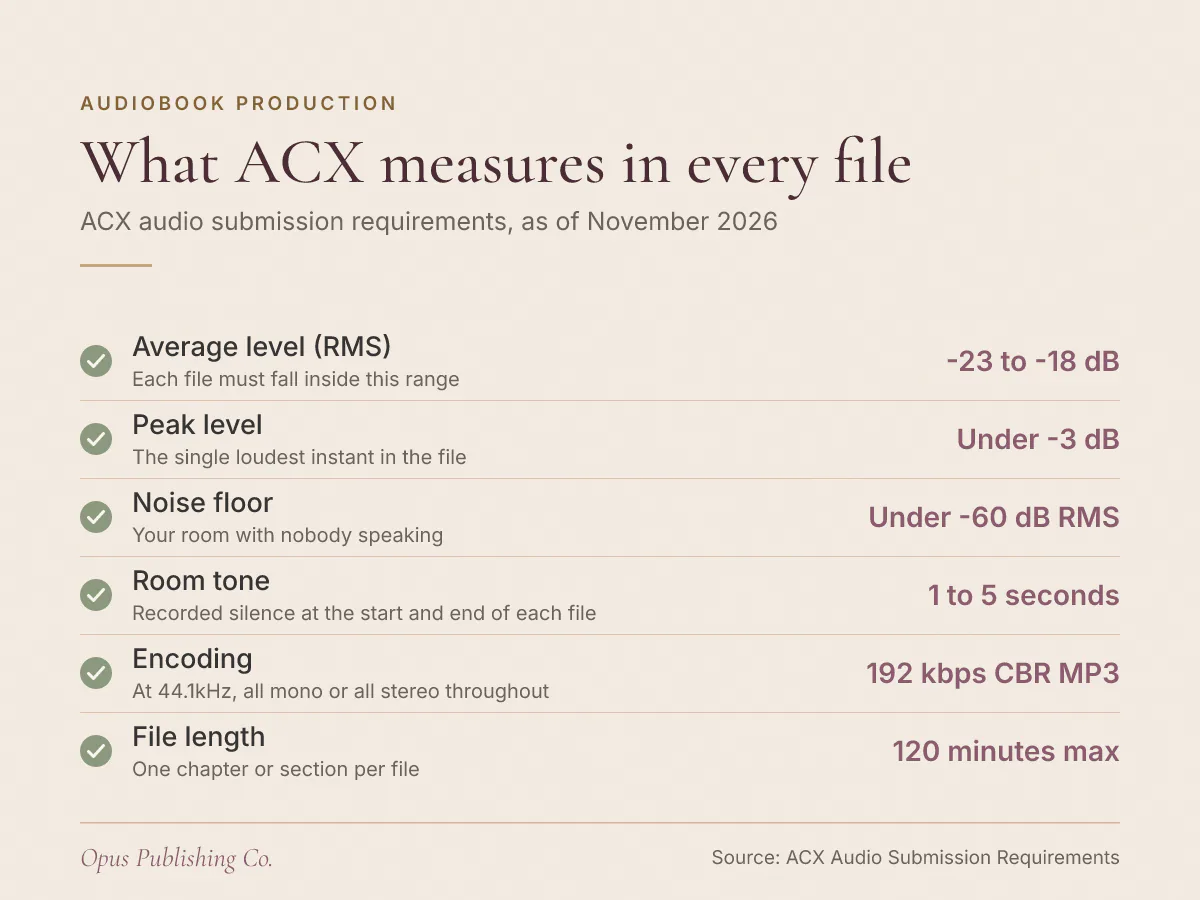
ACX measures the average level, the peak level and the noise floor of each file, checks for room tone at both ends, and checks your encoding. As of November 2026, the ranges below are what ACX's audio requirements state.
| What ACX checks | The requirement | What it means |
|---|---|---|
| Average level (RMS) | Between -23dB and -18dB RMS | RMS is the average energy of the file, roughly how loud it feels overall |
| Peak level | Less than -3dB | The single loudest instant, often a plosive, the burst of air on a p or b sound |
| Noise floor | Less than -60dB RMS | The level of your room when you are not speaking |
| Room tone | Between 1 and 5 seconds at the start and end | Recorded silence from your actual room, never digital silence |
| Encoding | 192 kbps or higher CBR MP3 at 44.1kHz | CBR means constant bit rate, so the file holds the same data rate throughout |
| File length | 120 minutes or shorter | One chapter or section per file, including its section header |
Two details in that table catch authors out. The room tone requirement caps at 5 seconds, so more is as wrong as none. And the file must be all mono or all stereo, consistent throughout, which means you cannot record chapter one in stereo and the rest in mono.
Higher bit rates are allowed. ACX accepts 256 or 320 kbps, and says the quality difference is negligible, so 192 kbps CBR is a fine target. For the full list of what the platform screens, see ACX Audio Requirements Explained in Plain English.
How Quiet Does Your Recording Room Need to Be?
Subtract ACX's own two limits and the answer is concrete: your room has to be at least 37dB quieter than your narrating voice. ACX wants a file averaging -23dB to -18dB RMS with a noise floor under -60dB RMS, so -23dB minus -60dB leaves 37dB.
Record at the louder end of the range and the gap widens. Taking -18dB RMS as your average and subtracting the same -60dB ceiling for noise leaves 42dB between your voice and your room. That is the number no gear list gives you, and it is the one that decides whether your closet works.
Here is why it matters more than any other spec. Turning the gain up lifts your voice and your room noise together, because the preamp, the circuit that boosts the microphone signal, cannot tell them apart. Push a quiet take up into the accepted range and the fridge, the fan and the street come up with it, straight through the ACX noise floor.
The practical test takes two minutes. Sit in position, start recording, say nothing for half a minute, then measure the RMS of that silence in your editor. If the silence is not comfortably under -60dB RMS, no microphone upgrade will save the session. Fix the room.
How Do You Treat a Room Without Building a Booth?
Treat the room in two passes: remove noise sources, then absorb reflections. Audiobook recording room treatment is mostly soft mass placed close to you, and almost none of it costs money. A built booth is the last resort, not the first step.
Noise first, because absorption does nothing about a compressor cycling on:
- Switch off heating, air conditioning and ceiling fans for the whole session, and accept that you will get warm.
- Unplug or move the mini fridge, air purifier and anything with a motor in the same room.
- Put your phone in airplane mode and your computer somewhere its fan is not in front of the mic.
- Pick the quietest hour of your day. Traffic, neighbours and garden equipment all have schedules.
- Close windows, and block the gap under the door with a rolled towel.
Then absorption, which is what stops your voice bouncing back into the mic and sounding boxy:
- Record in a clothes closet if you have one. Hanging garments are dense, irregular absorption, which is exactly what you want.
- Put soft mass behind the microphone and behind your head, since those reflections reach the mic first. A duvet over a door, a thick moving blanket on a clothes rail or a loaded bookshelf all work.
- Cover hard parallel surfaces: bare walls facing each other, a window, a desk top, a tiled floor. A rug and a blanket beat a few foam tiles.
- Avoid open-weave or light fluffy blankets. Sound passes straight through them.
- Build a small space rather than treating a large one. A corner draped on two sides gives you a quieter home audiobook studio setup than a half-treated living room.
Listen to a test recording on headphones before you treat anything else. If your voice sounds like it is in a box, you have too much hard surface close by. If you hear a steady hiss or rumble under your words, you still have a noise source running.
How Should You Set Your Mic, Gain and Export Settings?
Set your project to 44.1kHz before you record anything, aim your gain so peaks stay under -3dB, and export 192 kbps or higher CBR MP3. Mic settings for audiobook narration matter less than mic position: close, slightly off-axis and identical every session.
Position comes first. Speaking close to the microphone raises your voice relative to the room, which is the cheapest way to widen that separation, and it costs nothing. Angle the mic slightly off the line of your mouth, or use a pop filter, so plosives do not spike your peaks past -3dB.
In an untreated room, a dynamic microphone held close usually gives you a lower noise floor than a sensitive large-diaphragm condenser, because a condenser hears the whole room. A plain USB microphone on a boom arm, clear of the desk so keystrokes and knocks do not travel up the stand, is enough to pass.
Then the settings, in order:
- Create the project at 44.1kHz, before recording, so nothing has to be resampled later.
- Choose mono or stereo and keep it. ACX requires every file in the book to be all mono or all stereo, consistent throughout.
- Record a one-minute test: half a minute of silence, half a minute of reading.
- Measure peak, RMS and noise floor on that test. If you record in Audacity, the free ACX Check analyzer reports all three at once, and Reaper, Adobe Audition and Logic Pro have their own loudness metering.
- Adjust input gain so your reading sits inside -23dB to -18dB RMS with peaks under -3dB, then write the setting down and never touch the knob mid-book.
- Export each finished chapter as CBR MP3 at 192 kbps or higher, 44.1kHz, using only standard US alphanumeric characters in the file name.
Monitor on closed-back headphones while you record. Hearing the mic signal is how you catch the chair creak, the page turn and the stomach rumble in the moment, rather than deep into an editing session.
Which Recording Habits Make a Good Take Fail ACX?
Habits sink more submissions than equipment does. ACX requires audio that is consistent in sound and formatting with no extraneous sounds, and consistency is a discipline across weeks of sessions, not a setting you choose once.
- Trimming the room tone. Every file needs between 1 and 5 seconds of room tone, meaning recorded silence from your own space, at the beginning and the end. Never more than 5 seconds. Cutting tight to the first word fails this, and so does pasting in digital silence, which reads as a hole in the sound.
- Moving the mic. Shifting the stand, the chair or your distance between sessions changes the tone of your voice and the level of the room. Mark the floor and the stand height.
- Letting the gain drift. A new gain setting mid-book shifts your RMS and your noise floor together, so chapter nine can fail on noise while chapter eight passed.
- Packing files wrong. ACX wants one chapter or section per file, each file including its section header read aloud, for example "Chapter 1", and each file 120 minutes or shorter.
- Forgetting the credits. Opening credits must state the audiobook's title, author or authors, and narrator or narrators. For closing credits, ACX's best practice is "You have been listening to" with the title, author and narrator, followed by "The End".
- Rescuing noise with software. Heavy noise reduction lowers the measured floor and thins the voice as it goes, which works against the requirement for consistent sound. Re-record the chapter in a quieter hour instead.
One habit that saves hours: read the manuscript for narration problems before you record a word. Numbered lists, tables and footnotes all have to become speech. Prepare Your Manuscript for Audiobook Narration covers what to change on the page.
What to Do This Week Before You Record Chapter One
Spend your first session testing the space rather than narrating. Four short tasks tell you whether your room can carry a whole book, and they cost nothing but an afternoon.
- Run the silence test. Sit in position, record half a minute of nothing, and measure the RMS. Under -60dB RMS and you have a room. Over it, hunt the noise until you are under.
- Treat one corner. Hang a duvet or blanket behind the mic and behind your head, then repeat the silence test and a short reading test. Compare the two recordings back to back.
- Lock your setup. Once a take passes, photograph the mic position, note the gain and the project settings, and record every session that way.
- Record your retail sample. ACX's sample is 5 minutes or less and ACX recommends using the first five minutes of the book, with no explicit material. Producing that one passing file proves the pipeline before you commit to a whole book.
Check your numbers against the platform's own page, ACX Audio Submission Requirements, as they can change. If the audio is going out alongside new ebook and print editions, our publishing and distribution page covers the setup and metadata side of getting all three formats listed.