Your files came back from the audio check, or you are about to record chapter one and would rather not learn this the slow way. Either way, the ACX audio requirements reduce to five measurements, one file format, and a short list of rules about credits, length and naming. ACX, the Audiobook Creation Exchange, is Amazon's audiobook production and distribution marketplace, and its audio check is arithmetic rather than opinion.
What Are the ACX Audio Requirements?
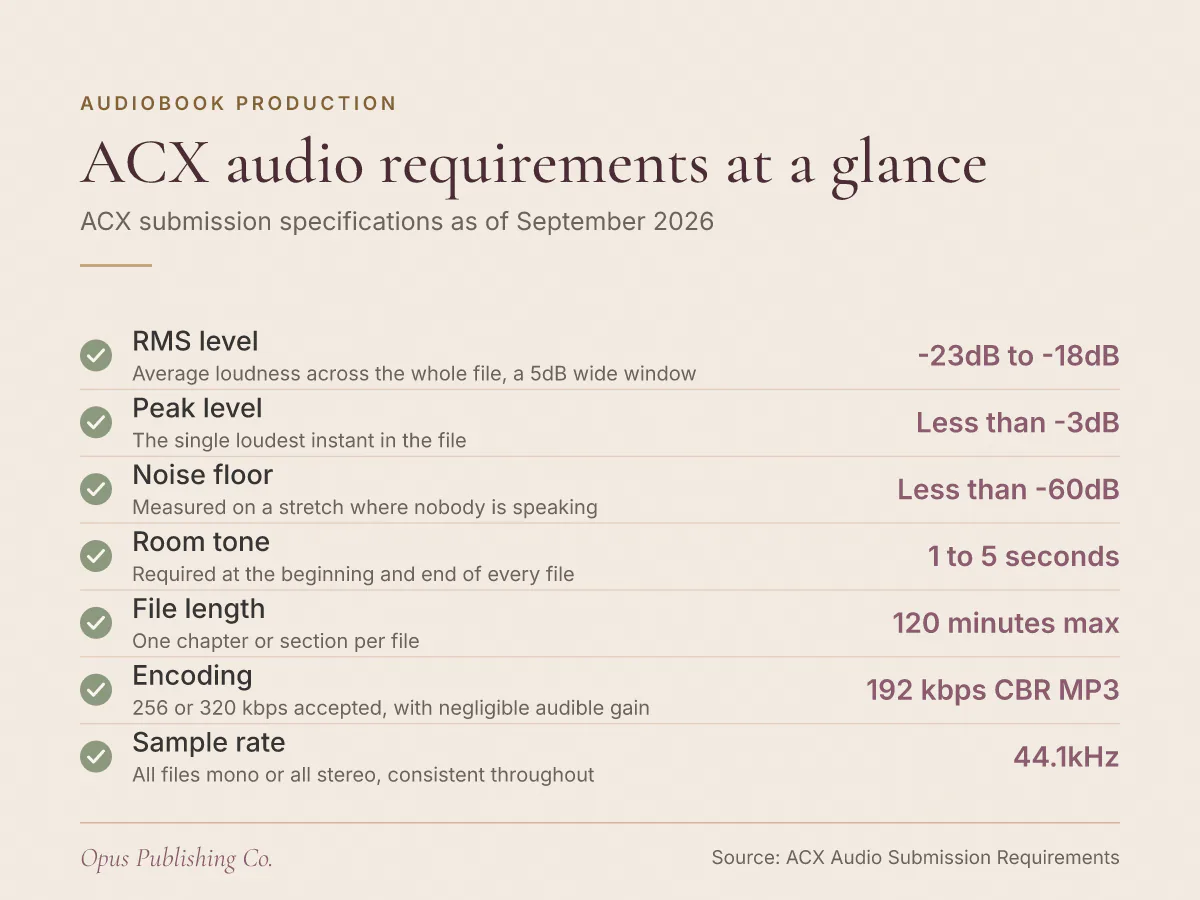
ACX requires every file to measure between -23dB and -18dB RMS, to peak below -3dB, and to hold a noise floor below -60dB RMS. Files are encoded as 192 kbps or higher CBR MP3 at 44.1kHz, and no single file runs longer than 120 minutes.
Those figures come from ACX's audio submission requirements and are current as of September 2026. A few definitions before the table, because the numbers only mean something once you know what they measure.
dB is the decibel, the unit audio software uses for level, counting down from 0 at the top of the digital scale, so every value here is negative. RMS, short for root mean square, is a measure of average loudness across a stretch of audio rather than at one instant. CBR means constant bit rate: the encoder spends the same data per second on quiet passages as on loud ones.
| Requirement | What ACX asks for | What the number controls |
|---|---|---|
| RMS level | Between -23dB and -18dB | How loud the narration sits on average |
| Peak level | Less than -3dB | The single loudest instant in the file |
| Noise floor | Less than -60dB RMS | How quiet the file is when nobody speaks |
| Room tone | Between 1 and 5 seconds at the start and end | The pad at each edge of a file |
| File length | 120 minutes or shorter | How you split long chapters |
| Encoding | 192 kbps or higher CBR MP3 at 44.1kHz | The file you actually upload |
| Channels | All mono or all stereo | Consistency across the whole book |
Seven rows, and a file has to satisfy all of them. Miss one and the rest of the work does not compensate.
What Do RMS, Peak and Noise Floor Mean When You Are Recording?
RMS is the average loudness of a file over time. Peak is its single loudest instant. The noise floor is the level of your room and your gear when nobody is speaking. ACX puts a pass or fail number on all three.
RMS level
The ACX RMS level requirement is a window, not a target: between -23dB and -18dB, which is 5dB wide. Narration that drifts quieter across a long session fails at the bottom of that window even when individual sentences sound fine.
Measure RMS across the whole file, not across a sentence you like. Most editors show a running average or a loudness readout for a selection; select everything and read the number.
Peak level
Peak has to stay below -3dB. Take the top of the RMS window, -18dB, and subtract the peak ceiling of -3dB: that leaves 15dB of room for your loudest consonant before it clips the ceiling.
That gap is the reason a plosive matters. A hard p or b hitting the microphone can jump far above your average level in a few milliseconds, and one of them breaks the file.
Noise floor
The ACX noise floor requirement is stricter than most home rooms manage on the first try: less than -60dB RMS. A file at -23dB RMS with a noise floor at -60dB has 37dB between narration and silence, which you get by subtracting one from the other.
Measure the noise floor on a stretch where you are not speaking. A refrigerator compressor, a laptop fan, a fluorescent ballast or traffic through single glazing all live in that number, and so does the hiss of a cheap preamp turned up to compensate for a quiet performance.
Why Did ACX Reject My Audiobook Files?
ACX's requirements are pass or fail. A file sitting outside any of the stated ranges, or breaking a content rule, does not meet them, and the fix depends on which measurement failed. Order matters more than which software you own.
Here is the interaction that catches people twice. Gain is gain: every decibel you add to lift a quiet performance into the -23dB to -18dB RMS window lifts the noise floor by exactly the same amount. Fix the loudness first and you can push a noise floor that was passing up past -60dB. Fix the noise floor first and the loudness move you make afterwards is smaller, because a clean recording needs less help.
So work in this order:
- Fix the room and the source. Turn off the fan, kill the air conditioning, get away from the window, and perform at a consistent distance and energy. Everything below is repair work on what you captured.
- Measure the noise floor on a silent stretch and get it under -60dB RMS with treatment, a better position or restrained noise reduction. Heavy denoising leaves a watery artifact behind the voice, which counts as an extraneous sound.
- Even out the performance, then set the average level into the -23dB to -18dB RMS window.
- Check that no peak reaches -3dB, and fix the ones that do individually rather than squashing the whole file.
- Trim the head and tail to between 1 and 5 seconds of room tone.
- Export to 192 kbps CBR MP3 at 44.1kHz as the last action, once everything above passes.
Non-audio rules bounce files too. ACX requires human narration and prohibits unauthorized AI or text-to-speech narration, where text-to-speech means software that generates a synthetic reading voice from your manuscript. ACX also asks for file names in standard US alphanumeric characters, so an accented title or an ampersand in a file name is worth changing before you upload.
How Much Room Tone Does ACX Want at the Head and Tail?
ACX requires between 1 and 5 seconds of room tone at the beginning and end of every file, and never more than 5 seconds. Room tone is the sound of your recording space with nobody speaking, captured live rather than pasted in as digital silence.
Use the room's own quiet. A stretch of absolute digital silence next to narration reads as a dropout, and the join is audible.
File structure sits alongside room tone in the same set of rules:
- One chapter or section per file, and each file includes its section header, spoken as part of the audio, for example "Chapter 1".
- No file longer than 120 minutes. A long chapter has to be split, and each part still carries its own room tone at both edges.
- File names in standard US alphanumeric characters only.
- Audio consistent in sound and formatting across the whole book, with no extraneous sounds.
That last line is the one people underestimate. A book recorded across six weekends drifts in tone and level, and consistency is judged across the set, not file by file.
What Bit Rate and File Format Does ACX Accept?
ACX accepts MP3 at 192 kbps or higher, constant bit rate, at a 44.1kHz sample rate. Higher settings such as 256 kbps or 320 kbps are accepted, and ACX says the difference a listener hears is negligible.
Bit rate is measured in kbps, kilobits per second, which is how much data the encoder spends on each second of audio. Sample rate is measured in kHz, or kilohertz, and describes how many times a second the recording captures the waveform.
The ACX MP3 bit rate floor is a floor, not a recommendation to exceed. Going to 320 kbps buys you larger files and, by ACX's own account, no audible gain.
Channels have their own rule, and it is about consistency rather than preference: audio must be all mono or all stereo, the same throughout the book. Mixing a stereo chapter into a mono book breaks the requirement even if both files measure well.
Record and edit in a lossless format and export MP3 once, at the very end. Every MP3 re-encode discards data the next pass has no way to recover, so a file that was exported, re-opened, edited and exported again sounds worse than one exported once from the master.
What Belongs in Your Opening Credits and Retail Sample?
Opening credits state the audiobook's title, the author or authors, and the narrator or narrators. The retail sample runs 5 minutes or less, ACX recommends using the first five minutes, and the sample must not contain explicit material.
Closing credits indicate that the book is finished. ACX gives the best-practice wording: "You have been listening to", followed by the title, author and narrator, then "The End".
The retail sample is the part authors leave until last and then regret. A retail sample is the preview a shopper plays on the product page, so the first five minutes of your audiobook are doing sales work whether you planned them that way or not. If your book opens with a long front-matter read, a listener hears that instead of your prose. Two practical consequences:
- If the sample must not contain explicit material and your opening chapter does, the first five minutes are the wrong five minutes, and you need a different passage.
- What a listener hears first is a production decision, not a leftover, so choose it with the same care you would give a cover.
Your Next Steps Before You Upload
Run one finished chapter all the way through this list before you record the rest of the book. A single file that clears every measurement proves your room, your microphone position and your export chain at once, and a chapter is a cheap place to discover a problem.
This week:
- Record one chapter, plus a silent stretch in the same session, and measure the noise floor on that silence.
- Work the fix order above, then confirm the file reads between -23dB and -18dB RMS with no peak reaching -3dB.
- Export at 192 kbps CBR MP3 at 44.1kHz and check the head and tail hold between 1 and 5 seconds of room tone.
- Play the first five minutes as a listener would and decide whether that passage is the retail sample you want.
Lock your manuscript before the narrator starts. A typo caught in print costs a file upload, while a line changed after recording costs a studio session, so finish copy editing first and treat the text as final on the day recording begins.
Once the audio passes, the remaining work is listing and distribution: metadata, categories, and the accounts your book is sold through. Our publishing and distribution page covers how that setup fits with the rest of a release.